
Скачать Subliminals Work – бесплатный инструмент для macOS, безопасная загрузка, регулярные обновления
Обзор
Subliminals Work — это бесплатная, лёгкая программа, созданная специально для пользователей macOS, желающих исследовать силу подсознательных сообщений в безопасной и удобной среде. Разработанное компанией PPL Development Company LLC, это приложение, ориентированное на образ жизни, позволяет внедрять позитивные аффирмации, мотивационные подсказки и персонализированные сообщения в повседневные медиа‑файлы, такие как музыка, видео или даже фоновые звуки рабочего стола. Основная идея Subliminals Work — предоставить незаметный, ненавязчивый способ укрепления личных целей, будь то повышение уверенности, улучшение концентрации или развитие более здоровых привычек. Поскольку программное обеспечение бесплатно и распространяется на английском языке, оно легко доступно глобальной аудитории, ищущей простой, но эффективный инструмент для саморазвития.
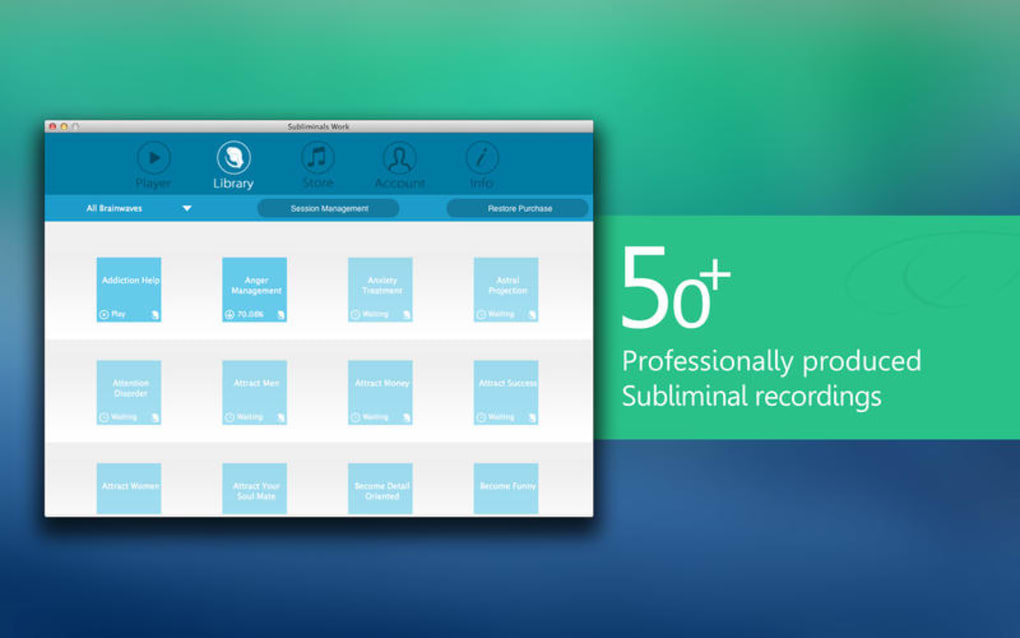
Философия дизайна основана на минимализме и безопасности. Пользователи могут загрузить установочный файл напрямую с официального сайта, где файл подписан сервисом нотарификации Apple, что гарантирует прохождение проверок Gatekeeper в macOS. После установки Subliminals Work работает тихо в строке меню, позволяя активировать или приостанавливать подсознательные треки одним щелчком. Интерфейс предоставляет чёткую визуальную обратную связь, указывая, какие сообщения сейчас воспроизводятся, и предлагает варианты регулировки громкости, частоты и длительности воспроизведения.
Помимо личного развития, программа может стать ценным помощником для преподавателей, терапевтов или всех, кто интересуется психологией внушения. Её архитектура, вдохновлённая открытым исходным кодом, позволяет продвинутым пользователям погрузиться в настройки, настраивать библиотеки сообщений или даже интегрировать сторонние аудио‑источники. Всё это предоставляется без необходимости подписки, премиум‑обновлений или скрытых платежей — делая Subliminals Work действительно бесплатным решением для тех, кто хочет использовать тонкое влияние позитивных аффирмаций в macOS.
Ключевые особенности
- Free & No Ads: Полностью бесплатно для загрузки и использования без рекламных прерываний.
- Menu‑Bar Control: Быстрый запуск/остановка из строки меню macOS для бесшовной интеграции в ежедневный рабочий процесс.
- Custom Message Library: Импорт, создание или редактирование собственной библиотеки подсознательных утверждений в формате простого текста или CSV.
- Audio Integration: Привязка подсознательных треков к любому аудио‑источнику — музыкальным плейлистам, подкастам, видео YouTube или системным звукам.
- Adjustable Playback Settings: Управление громкостью, частотой повторения и длительностью плавного появления/исчезновения для комфортного восприятия.
- Secure macOS Notarization: Установочный файл подписан и нотариально заверен Apple, обеспечивая безопасную установку.
- Lightweight Footprint: Потребляет менее 30 МБ ОЗУ и минимальные ресурсы ЦП, сохраняя ваш Mac быстрым.
- Multi‑Language Support (Future‑Ready): Сейчас — английский, планируются переводы сообществом в будущих версиях.
- Regular Updates: Автоматическая проверка фоновых обновлений; обновления доставляются через встроенный механизм.
- Privacy‑First Design: Нет сбора данных, аналитики или интернет‑коммуникаций, если вы явно не включите облачную синхронизацию библиотек сообщений.
Installation & Usage Guide
Getting started with Subliminals Work is straightforward, even for users who are new to macOS utilities. Follow these steps for a smooth installation and immediate use:
Step 1 – Download the Installer
Visit the official PPL Development Company LLC website and click the prominent “Download for macOS” button. The file you receive will be a .dmg package named SubliminalsWork.dmg. Because the app is notarized, macOS will display a trust prompt confirming the developer’s identity.
Step 2 – Mount & Install
Double‑click the .dmg file to mount it. A window appears showing the app icon and an Applications folder shortcut. Drag the Subliminals Work icon onto the Applications folder to copy it. macOS may ask for your administrator password—enter it to authorize the move.
Step 3 – Launch & Grant Permissions
Open the Applications folder and double‑click Subliminals Work. The first launch triggers a security dialog asking whether you trust the developer; click “Open.” The app will request access to your microphone and audio output devices; grant these permissions for the subliminal tracks to blend with your media.
Step 4 – Configure Your First Session
Once the app appears in the menu bar, click the icon to reveal the control panel. Choose “Create New Library” and type a list of affirmations—each line represents a separate message (e.g., “I am confident,” “My focus sharpens daily”). Save the library as my_affirmations.txt. Next, select your audio source: you can link Subliminals Work to iTunes, Spotify, or any system sound by toggling the “Audio Hook” switch.
Step 5 – Fine‑Tune Playback
Adjust the volume slider so that the subliminal messages sit just beneath your primary audio. Set the repetition interval (e.g., every 10 seconds) and enable “Fade In/Out” for a smoother listening experience. Click “Start” to begin the session. You’ll notice a subtle indicator confirming that the messages are playing in the background.
To stop the session, simply click the menu‑bar icon again and select “Pause.” All settings are saved automatically, so the next time you launch the app, you can resume where you left off or load a different library for a new goal.
Compatibility & System Requirements
Subliminals Work is engineered for modern macOS environments while maintaining a lean resource profile. Below are the officially supported configurations:
- Supported macOS Versions: macOS 10.15 Catalina, macOS 11 Big Sur, macOS 12 Monterey, macOS 13 Ventura, and later releases.
- Hardware Requirements: Any Mac with at least 2 GB of RAM and a dual‑core processor. The app runs comfortably on Intel‑based Macs as well as Apple Silicon (M1, M2, and newer) thanks to universal binaries.
- Disk Space: Approximately 30 MB of free storage for the application bundle; additional space needed for custom message libraries (typically a few kilobytes per file).
- Audio Dependencies: Utilizes macOS Core Audio; no third‑party drivers are required. Works with built‑in speakers, headphones, and external audio interfaces.
- Security & Permissions: Requires “Microphone” and “Audio Output” permissions. These are standard for any app that processes sound on macOS.
- Internet Access (Optional): Only needed for checking updates or downloading community‑contributed message packs. The core functionality works entirely offline.
Because the app is notarized, it passes Apple’s Gatekeeper checks without prompting the user to override security settings. Users on older macOS versions (pre‑Catalina) may encounter compatibility warnings, so upgrading to at least macOS 10.15 is recommended for the best experience.
If you run into any issues—such as audio lag or permission dialogs—consult the built‑in “Help” menu or visit the support forum on the developer’s website. The community is active, and most problems are resolved within minutes thanks to detailed troubleshooting guides and frequent software patches.
Pros & Cons
Pros
- Completely free with no hidden fees or ad interruptions.
- Lightweight design ensures minimal impact on system performance.
- Secure, notarized installer guarantees a safe macOS experience.
- Highly customizable message libraries for personalized affirmation goals.
- Menu‑bar integration provides instant control without leaving your workflow.
- Regular automatic updates keep the app compatible with new macOS releases.
- Privacy‑first architecture—no data collection or telemetry.
- Works with any audio source, from music streaming services to local media files.
- Supports both Intel and Apple Silicon Macs through universal binaries.
- Active user community offering shared affirmation packs and tips.
Cons
- Currently limited to English interface; multilingual support is slated for future updates.
- No native Windows or Android version—exclusively macOS.
- Advanced audio routing may require third‑party plugins for niche setups.
- No built‑in analytics to track the effectiveness of subliminal sessions.
- Customization of playback patterns is limited to preset intervals.
Overall, Subliminals Work delivers a solid, free solution for macOS users seeking to incorporate subliminal messaging into their daily routine. Its ease of use, security, and lightweight footprint outweigh the minor limitations around language support and advanced analytics. For anyone interested in personal development tools that operate quietly in the background, this app is a standout choice.
Frequently Asked Questions
Is Subliminals Work really free or are there hidden costs?
Subliminals Work is 100 % free. There are no subscription fees, in‑app purchases, or ad‑based revenue models. All features described in the official documentation are available to any user who downloads the app from the official website.
Can I use Subliminals Work with Spotify or Apple Music?
Yes. The app hooks into macOS’s system audio output, meaning any sound that plays through your Mac—including Spotify, Apple Music, or local media players—can be paired with subliminal messages. Just enable the “Audio Hook” toggle in the menu‑bar panel.
Do I need an internet connection to run the program?
No. Once the app is installed, all core functions work offline. Internet access is only required for optional features such as checking for updates or downloading community‑shared affirmation libraries.
Is my personal data collected or shared?
Subliminals Work follows a privacy‑first design. It does not collect, store, or transmit any personal data unless you explicitly enable cloud sync for your message libraries. Even then, the data is encrypted and never sold to third parties.
How often are updates released, and are they automatic?
The development team releases minor patches every 4–6 weeks and major feature updates roughly twice a year. The built‑in updater checks for new versions in the background and prompts you to install with a single click, ensuring you stay on the latest, most secure build.
Conclusion & Call to Action
If you’re looking for a straightforward, secure, and completely free way to integrate subliminal affirmations into your macOS workflow, Subliminals Work stands out as a polished and reliable option. Its menu‑bar accessibility, low resource consumption, and customizable message libraries make it suitable for both beginners and seasoned personal‑development enthusiasts. By adhering to Apple’s notarization standards and keeping user privacy at the forefront, the app offers peace of mind alongside its motivational benefits.
Ready to start shaping your mindset effortlessly? Download Subliminals Work now and experience the subtle power of positive reinforcement on your Mac. Remember to check the automatic update feature regularly to enjoy the latest enhancements and keep your system secure.







